A Standard Business Invoice Template in Word Doc is one of the most important tools for managing client payments and keeping your business organized. Whether you are a freelancer, a small business owner, or part of a large company, having a professional invoice helps you handle your billing quickly and efficiently. Using a well-structured invoice …
A Standard Business Invoice Template in Word Doc is one of the most important tools for managing client payments and keeping your business organized. Whether you are a freelancer, a small business owner, or part of a large company, having a professional invoice helps you handle your billing quickly and efficiently.
Using a well-structured invoice ensures that every transaction is recorded properly, your clients clearly understand what they are paying for, and your business looks professional at all times.
Table of Contents
ToggleWhy You Need a Standard Business Invoice
A business invoice is a formal record of the sale of goods or services. It shows what was sold, the price, and when the payment is due. Here are key reasons every business should use a standard invoice template:
1. Clarity and Transparency
A standard invoice clearly lists the products or services provided, their costs, and the total amount due. This avoids confusion and helps maintain a transparent relationship with clients.
2. Professional Appearance
A clean, well-designed invoice gives your business a credible and professional look that builds trust with your customers.
3. Financial Record Keeping
Invoices serve as important financial records for accounting, tax filing, and future reference.
4. Legal Proof of Transaction
A proper invoice is a legal document that confirms a sale took place, protecting both parties if a dispute arises.
What a Standard Business Invoice Template Should Include
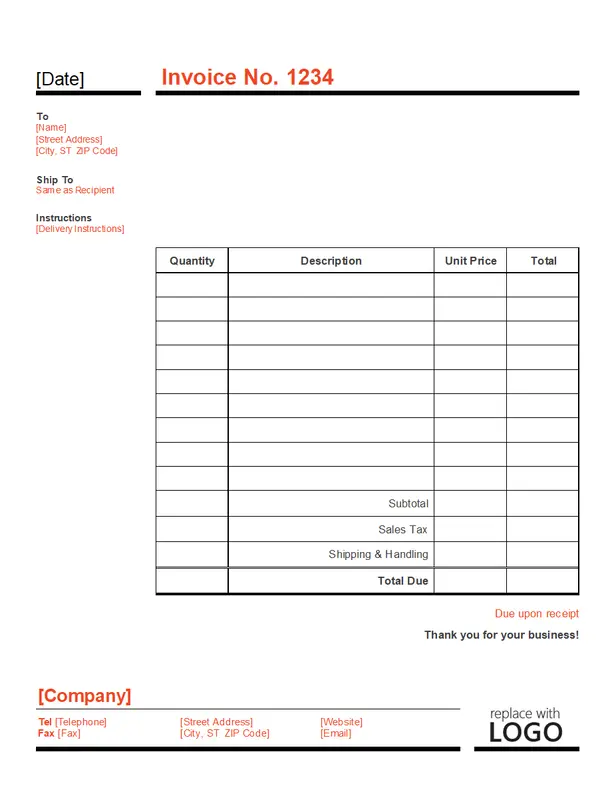
A Standard Business Invoice Template in Word is designed to include all the essential elements needed for clear communication and compliance. Here’s what to include:
-
Business Information: Your company name, logo, and contact details such as address, email, and phone number.
-
Client Information: The name, address, and contact details of your client.
-
Invoice Number: A unique number for easy tracking and record-keeping.
-
Invoice Date: The date the invoice is issued.
-
Payment Terms: Details on when and how payment should be made, including due dates or late fees.
-
Itemized List: A breakdown of all goods or services provided, including quantity, description, unit price, and total cost.
-
Subtotal and Total: Display the subtotal before tax, the tax amount (if applicable), and the final total due.
-
Sales Tax or VAT: Show the tax rate and the amount charged.
-
Payment Methods: Include available payment options such as bank transfer, PayPal, or credit card.
-
Additional Notes: Optional messages like thank you notes, return policies, or terms and conditions.
Benefits of Using a Standard Business Invoice Template
1. Saves Time and Effort
Instead of designing an invoice every time, simply edit the template with your business details and send it.
2. Improves Accuracy
Templates include ready-made fields that reduce errors and ensure every invoice is complete and clear.
3. Consistent Branding
Using the same design for all invoices keeps your documents consistent and helps reinforce your brand identity.
4. Easy Customization
Most Word invoice templates can be easily customized to match your logo, colors, and style.
5. Better Cash Flow Management
Clear payment instructions and due dates help clients pay on time, keeping your cash flow steady.
How to Use a Standard Business Invoice Template in Word
Using a Word Doc invoice template is simple. Follow these steps:
-
Download the Template: Choose a free or paid invoice template that fits your business needs.
-
Edit Business and Client Details: Add your business name, logo, and contact information, then include the client’s details.
-
Fill Out the Invoice Items: Enter the list of products or services, along with quantities and prices.
-
Check and Review: Make sure all amounts, dates, and terms are accurate.
-
Save and Send: Save the invoice as a PDF and email it to your client or print it for delivery.
DOWNLOAD THIS INVOICE TEMPLATE
Best Practices for Sending Invoices
-
Send Invoices Promptly: Issue your invoice immediately after completing the work or delivering goods.
-
Set Clear Payment Terms: Include due dates, late fees, and accepted payment methods.
-
Track All Invoices: Keep a record of every invoice sent to manage unpaid or pending payments.
-
Follow Up: If payment is delayed, send polite reminders to ensure timely processing.
Final Thoughts
A Standard Business Invoice Template in Word Doc is a smart and efficient tool for any business. It keeps your billing process simple, accurate, and professional while helping you maintain organized financial records.
Whether you’re a freelancer, entrepreneur, or corporate business owner, a standard invoice template can save time, reduce errors, and strengthen your professional image.
Start simplifying your billing process today — download a free Standard Business Invoice Template in Word Doc and make your invoicing faster and more efficient.

Brielle Kensington
Brielle Kensington is a career author and professional resume writer known for helping job seekers turn their experience into powerful personal stories. With a strong background in career development and modern hiring trends, she has helped hundreds of professionals craft resumes that stand out and get interviews.
Brielle specializes in writing clear, results-focused resumes, compelling cover letters, and LinkedIn profiles that attract recruiters. Her writing style is polished, strategic, and tailored to each client’s career goals. Through her books and career guides, she teaches simple but powerful strategies that help professionals confidently navigate today’s job market.
She believes every professional has a unique story, and the right words can open the right doors.