
A Business Sales Invoice Template in Word Doc is one of the most useful tools for any business. Whether you sell products or offer services, an invoice helps you record every sale clearly and professionally. It’s not just a paper — it’s an official proof of your transaction between you and your client. This simple …
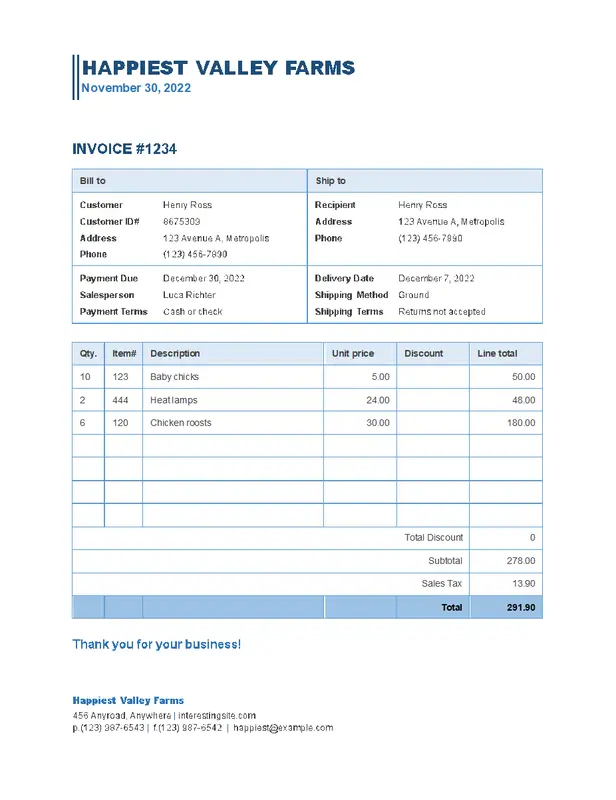
A Business Sales Invoice Template in Word Doc is one of the most useful tools for any business. Whether you sell products or offer services, an invoice helps you record every sale clearly and professionally. It’s not just a paper — it’s an official proof of your transaction between you and your client.
This simple guide explains why a business sales invoice is important, what to include in it, and how you can use a Word invoice template to make your invoicing process faster and more professional.
Table of Contents
ToggleWhy You Need a Business Sales Invoice Template
A business sales invoice is a legal record of what you sold, how much it cost, and when the payment is due. Using a ready-made Word Doc invoice template offers several benefits:
-
Clear Communication: The invoice shows exactly what was sold, the price, and the payment terms — avoiding confusion between you and your customer.
-
Professional Image: A well-designed invoice makes your business look serious and trustworthy.
-
Easy Record Keeping: Invoices are useful for bookkeeping, tax filing, and tracking your income.
-
Faster Payments: When details are clear, clients tend to pay faster.
What to Include in a Business Sales Invoice Template
Your sales invoice template in Word should include all important business and client details. Here’s what every professional invoice should have:
1. Business Information
-
Business name
-
Logo (optional but adds a professional touch)
-
Address, phone number, and email
2. Client Details
-
Client’s name or company name
-
Address and contact information
3. Invoice Number
Give each invoice a unique number for easy tracking.
4. Invoice Date
Mention the date you issued the invoice.
5. Payment Terms
State when payment is due, available payment options, and if there are discounts or late fees.
6. Description of Goods or Services
List what you sold — include product or service names, quantities, unit prices, and totals.
7. Subtotal and Tax
Show the subtotal before tax, add VAT or sales tax if needed, and display the total amount due.
8. Payment Methods
Include bank details, PayPal, or any other method you accept.
9. Notes or Messages
Add a thank-you note, warranty info, or return policy at the bottom.
Benefits of Using a Business Sales Invoice Template in Word
1. Saves Time
You don’t need to create invoices from scratch. Just edit the template and send it to your client.
2. Easy to Customize
You can change colors, fonts, and layout to match your brand.
3. Fewer Errors
Predefined fields help you avoid mistakes like missing totals or incorrect tax calculations.
4. Looks Professional
Every invoice you send looks neat and branded — helping you build trust with your clients.
5. Better Financial Control
Keep track of all sales, pending payments, and income easily.
Download your free Business Sales Invoice Template in Word Doc today
How to Use a Business Sales Invoice Template in Word
-
Download a Template
Find a free invoice Word Doc online that fits your business style. -
Open and Edit
Open it in Microsoft Word, then add your logo, business name, and contact info. -
Fill in Client Info
Include your client’s name, address, and contact details. -
Add Products or Services
List what you sold, quantity, and prices. -
Review and Save
Check all details — especially totals, tax, and due date. Save it as a PDF to keep the layout intact. -
Send the Invoice
Email it to your client or print it for physical delivery.
Best Practices for Sending Invoices
-
Send Quickly: Don’t delay sending your invoice after completing a job.
-
Follow Up: If payment is late, send a friendly reminder.
-
Be Clear: Make sure payment methods and due dates are easy to understand.
-
Keep Copies: Always save a copy of each invoice for your records.
Final Thoughts
A Business Sales Invoice Template in Word Doc is a must-have for any company that wants to stay organized and look professional. It saves time, keeps your records clean, and helps you get paid faster.
Whether you’re a freelancer, small business owner, or growing company, using a ready-made invoice template in Word is a smart and cost-free way to manage your sales transactions.

Brielle Kensington
Brielle Kensington is a career author and professional resume writer known for helping job seekers turn their experience into powerful personal stories. With a strong background in career development and modern hiring trends, she has helped hundreds of professionals craft resumes that stand out and get interviews.
Brielle specializes in writing clear, results-focused resumes, compelling cover letters, and LinkedIn profiles that attract recruiters. Her writing style is polished, strategic, and tailored to each client’s career goals. Through her books and career guides, she teaches simple but powerful strategies that help professionals confidently navigate today’s job market.
She believes every professional has a unique story, and the right words can open the right doors.